Control Configuration
PyCCAPT control runtime is configured with a TOML file:
default path:
pyccapt/config.tomlsupported format:
.tomlonly
Runtime loading follows this order:
Explicit config path (if provided by the caller)
config.tomlin the detected project root
Electrode List Configuration
The control GUI electrode dropdown is loaded from:
pyccapt/control/electrode.toml
Example:
[electrodes]
names = [
    "NiC1", # Nickel electrode
    "CuC1", # Copper electrode
    "NC",   # Not categorized
]
Electrode naming reference:
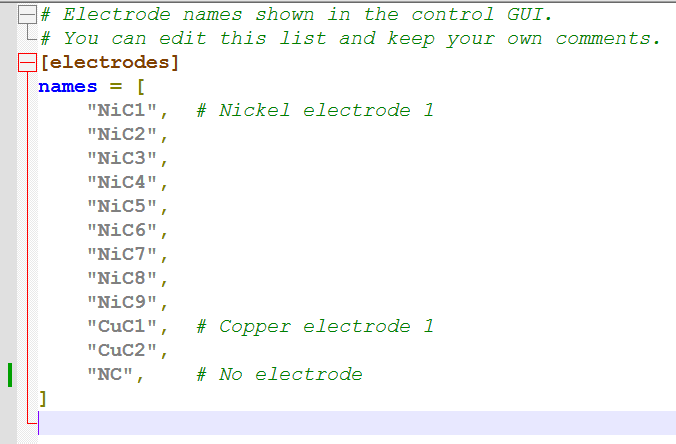
Use names that match your experimental workflow and the labels presented in the control GUI. In the default example, NiC1 refers to the nickel electrode and CuC1 refers to the copper electrode.
TOML supports comments, so lab-specific notes can be kept directly in this file.
Configuration Groups
The control configuration file is organized into a few logical groups.
Visualization and Calibration Constants
These settings define plotting mode and conversion constants used during control and visualization (for example, flight-path length and timing offsets).
Examples:
visualization = "mc"flight_path_lengtht_0_voltaget_0_lasermax_massmax_tof
Safety Limits and Control Bounds
These values define operating ranges and guardrails for voltages, pulse behavior, laser power, and cryogenic temperatures.
Examples:
max_vdcmin_vp/max_vppulse_fraction_maxmax_laser_powermax_temperature_cryo/min_temperature_cryo
Device Enable Flags
Hardware blocks can be enabled or disabled using "enabled" / "disabled".
Legacy "on" / "off" values still work.
Examples:
tdc,camera,gates,laser,stagepump_ll,pump_cll,gauges,cryov_dc,v_p,signal_generator,DAQ
Connection Identifiers
Connection endpoints are specified using COM_PORT_* keys.
Depending on the device, values can be serial COM ports, NI-DAQ paths, VISA
resource strings, or hardware IDs.
Examples:
COM_PORT_laser = "COM9"COM_PORT_gates = "Dev2/port0/"COM_PORT_signal_generator = "USB0::...::INSTR"
Best Practices
Start from
pyccapt/config.tomland keep it under version control.Add comments directly in the TOML file to document local lab settings.
Validate hardware port values before experiment runs.
Keep conservative bounds for safety-critical settings.